
Your employer just told you that you have a $2,000 learning stipend that expires December 31. You've narrowed it down to Coursera or Udemy, but the pricing models are so different that a head-to-head is harder than it should be. Udemy wants $10 to $200 per course; Coursera wants $49 to $79 per month. Udemy gives you a completion certificate; Coursera gives you a Professional Certificate from Google or IBM. Which actually earns your stipend in 2026?
This guide is a decision-grade comparison of Coursera vs Udemy, focused specifically on the case where you're spending employer money on professional skill-building. We cover pricing and how stipend reimbursement actually works, course quality, certificate recognition, which platform wins for which role, and the hidden cost that matters more than dollar price: completion rate. If you want to see the ROI math on a specific course, plug it into the Course ROI Calculator before committing hours.
Quick Answer by Use Case
If you only have 30 seconds, this is the decision matrix:
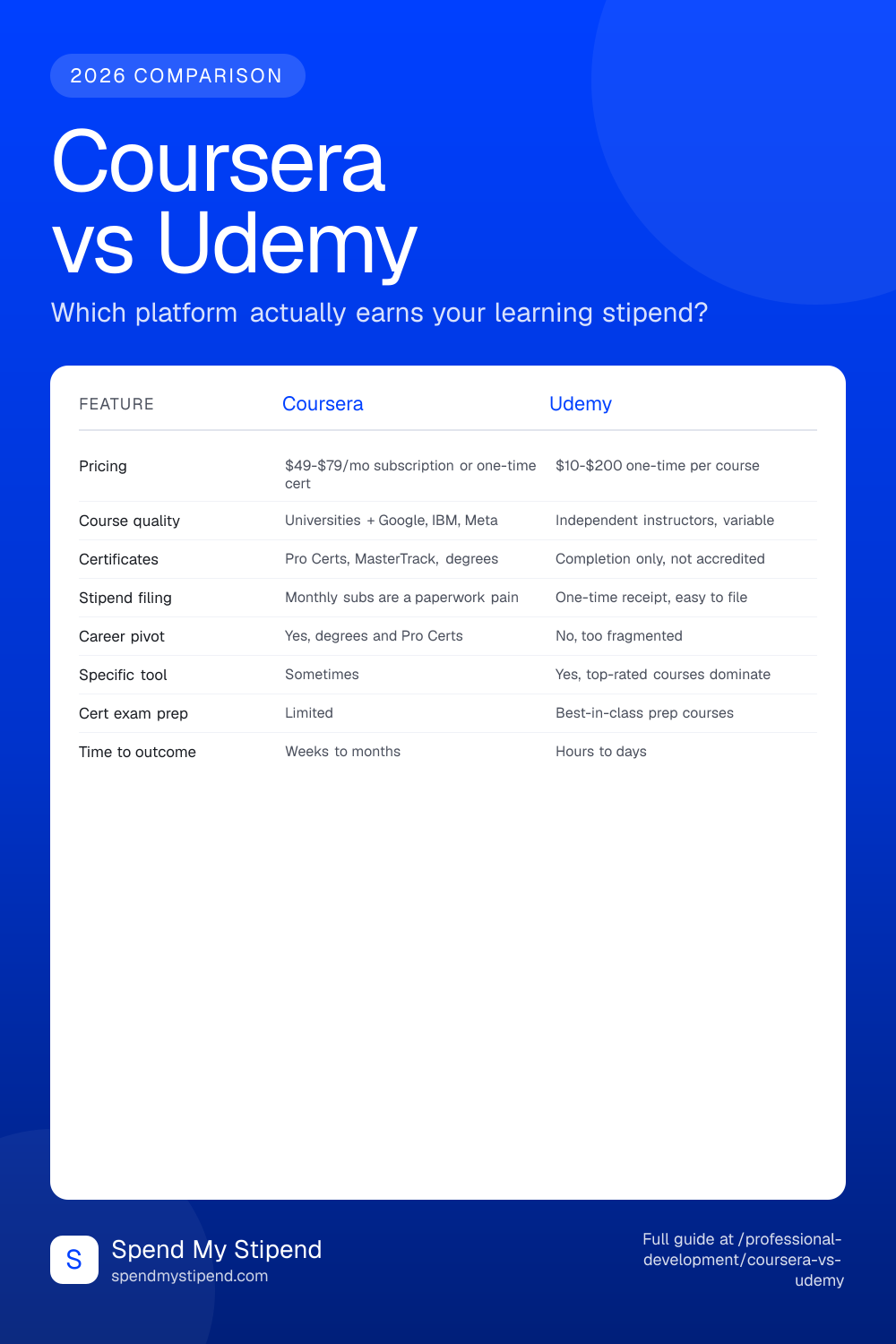
| Your goal | Winner | Why |
|---|---|---|
| Career pivot (new role or industry) | Coursera | Professional Certificates from Google, IBM, and Meta carry more resume weight than any Udemy credential. |
| Learn a specific tool (Figma, Excel, Stripe API) | Udemy | The highest-rated Udemy course on a specific tool usually beats Coursera's equivalent on depth and practical examples. |
| Pass a certification exam (AWS, PMP, CFA) | Udemy | Stephane Maarek, Joseph Phillips, and Maarek-tier instructors dominate exam prep. Practice tests included. |
| Get a degree or MasterTrack credential | Coursera | Coursera is the only platform with full online bachelor's and master's degrees from accredited universities. |
| Get a completion certificate for your manager | Udemy | Under $30, completed in a weekend, one PDF in your inbox. Low-stakes, low-effort. |
| Build a tech skill for the next promotion | Either | Depends on the specific skill. ML and data science lean Coursera; DevOps and specific frameworks lean Udemy. |
The rest of this guide fills in the reasoning behind each row.
Pricing and How Stipend Reimbursement Actually Works
Coursera and Udemy have fundamentally different pricing models, and this matters more than most people realize when you're filing for stipend reimbursement.
Udemy: one-time, per course
Udemy lists most courses at $84.99 to $199.99 but runs near-constant sales that drop prices to $9.99 to $24.99. If you see a course at full price, wait three days; it will almost certainly drop by 70 to 90 percent. Each course is a one-time purchase with lifetime access, and you get a clean receipt with course title, date, and amount. Reimbursement paperwork takes two minutes.
Udemy Business is a separate product your employer might provide directly. It's a subscription to a curated catalog of 25,000+ courses. If your company has Udemy Business, don't pay for individual Udemy courses with your stipend; use your stipend on Coursera or MasterClass instead and keep Udemy for the free-to-you side.
Coursera: subscription or one-time
Coursera has three pricing tiers that interact awkwardly with stipend budgets:
- Coursera Plus ($59/mo or $399/yr): unlimited access to most of the catalog. Best value if you'll complete 4+ courses in a year.
- Specializations ($49-$79/mo): a bundle of 3 to 6 courses paid monthly until you finish. Cancel anytime.
- Professional Certificates ($49-$79/mo, typically 3 to 6 months): like Specializations but employer-recognized (Google IT Support, Meta Marketing Analytics, IBM Data Science, etc).
- Standalone courses and MasterTrack certificates: higher one-time prices ($300-$2,000+).
- Degrees: full bachelor's and master's from partner universities, $9,000 to $45,000 total.
The monthly billing is where stipend reimbursement gets annoying. If your employer requires quarterly or annual reimbursement submission, you end up stacking six monthly $59 charges against one receipt instead of one clean $399 annual subscription. Practical advice: if you commit to Coursera Plus, pay annually ($399) and submit the receipt once. It's also $309 cheaper over 12 months than monthly billing.
Under Section 127 tax rules
Both platforms qualify as education assistance under Section 127 of the IRS code, meaning up to $5,250/year of employer reimbursement is tax-free. Read our full tuition reimbursement guide for the rules and use the Tuition Reimbursement Calculator to see exactly how much your employer's reimbursement is worth after taxes at your bracket.
Course Quality and Instructor Caliber
The quality gap is real but not the way most people describe it.
Coursera's quality floor is higher. Every course goes through university or corporate editorial review. Production values are consistent. You're guaranteed at least a competent instructor with credentials. The worst Coursera course is still usually decent.
Udemy's quality ceiling can be higher. The best Udemy courses on any specific topic often beat the equivalent Coursera course on practical depth. Stephane Maarek's AWS courses, Colt Steele's web development courses, and Krish Naik's data science courses set the bar for practical, hands-on instruction. But you have to find them: Udemy has roughly 220,000 courses and the long tail is dire.
How to separate signal from noise on Udemy
Use these filters. They aren't foolproof but they cut the noise 80 percent:
- 4.6+ star rating AND 10,000+ reviews. Lower either number and you're gambling. A 4.8-star course with 300 reviews is statistically meaningless.
- Last updated within 12 months. Shown in the course header. Critical for anything tech-adjacent; a 2022 React course is already obsolete.
- Look at the instructor's other courses. Top Udemy instructors are known quantities. Googling "Stephane Maarek AWS Reddit" or "Colt Steele JavaScript Reddit" takes 30 seconds and tells you everything.
- Preview the first 3 lessons. Udemy lets you preview a subset for free. If the audio is bad or the instructor is reading a script, bail.
Coursera doesn't require this level of vetting. You can pick a course based on the partner institution and pretty much trust the quality.
Certificates and Career Recognition
This is where Coursera pulls decisively ahead for most career-focused use cases.
Coursera certificates hiring managers actually know:
- Google Career Certificates (IT Support, Data Analytics, UX Design, Project Management, Cybersecurity, IT Automation with Python): meaningful enough that Google and partner companies treat them as a bachelor's-equivalent signal for entry-level roles.
- IBM Professional Certificates (Data Science, AI Engineering, Full Stack Developer): strong in data and engineering pipelines, widely recognized.
- Meta Professional Certificates (Front-End, Back-End, Database Engineer, Marketing Analytics): recognition has grown quickly since Meta launched them.
- MasterTrack Certificates and Specializations from Wharton, Stanford, University of Michigan, Johns Hopkins, and others: these sit between a standalone course and a graduate degree. They cost $2,000 to $5,000 and take 3 to 6 months. Employers generally treat them as serious continuing education.
- Full bachelor's and master's degrees: same weight as if you got the degree on campus, because it's the same degree from the same university.
Udemy certificates: completion certificates only. They're not accredited. They show "Course Completed on [date]" with the instructor's signature. Some hiring managers will accept them as evidence of effort; most won't count them as credentials. Our honest take: put Udemy courses in the Skills section of your resume (the skill itself, not the certificate) and save certificate-mentions for Coursera credentials that employers recognize.
The one exception: Udemy courses for passing a certified exam (AWS, Azure, PMP, CFA, Scrum Master, etc.). In those cases the real credential is the certification, and Udemy is just the prep vehicle. Stephane Maarek's AWS courses are the gold-standard prep for those exams.
Which Platform for Which Role
Our opinions by role, based on what's actually ranked highly in the 2026 professional-development landscape.
Software engineer
Split the stipend. Use Udemy for framework-specific deep dives (Colt Steele, Maximilian Schwarzmüller, Stephen Grider). Use Coursera for system design, ML, and computer science fundamentals from universities. See our roundup of the best AI tools for software engineers if you're pivoting toward AI tooling specifically.
Product manager
Coursera wins. Meta's Professional Certificate in Marketing Analytics, University of Virginia's Digital Product Management Specialization, and the Google PM Certificate are the three canonical options. Udemy has PM courses but they're too fragmented for the PM job market, which weights frameworks and credentials.
Data scientist
Coursera first, Udemy second. The IBM Data Science Professional Certificate, Deep Learning Specialization by Andrew Ng (the single most-cited ML course on the internet), and any of the Johns Hopkins Specializations are where to start. Use Udemy for specific tools (dbt, specific ML libraries, data engineering frameworks) once you have the foundation.
Designer
Either, leaning Coursera for fundamentals and Udemy for tools. Google UX Design Certificate is a solid starting point; specific Figma, Webflow, and design-system courses on Udemy are often sharper than the Coursera equivalents.
Finance and business
Coursera, heavily. Wharton, Yale, and University of Illinois run the three most-cited online business programs. Udemy finance courses exist but don't carry the same weight.
Marketing
Mixed. Google Digital Marketing Certificate is a strong baseline from Coursera. Meta's marketing analytics cert adds to it. But Udemy has sharper individual courses on specific tools (Google Ads, GA4, Ahrefs, email automation platforms).
The Hidden Cost: Completion Rates
The real cost of a course isn't the dollar price. It's the 30 to 80 hours it takes to finish. If you don't finish, you got zero value.
Udemy's average completion rate across all courses is estimated at 5 to 15 percent. Coursera's completion rate sits higher because the structured deadlines and subscription-based Specializations create real pressure to keep going. If you've bought a Udemy course and not opened it in three months, you're in the 85 percent, and the course was a $30 donation.
Two rules that help:
- Block calendar time before enrolling. Look at the course's stated length (say, 30 hours), divide by weekly time you can commit (say, 3 hours), and hold that many weeks on your calendar. If you can't, don't enroll.
- Prefer paced to self-paced. Coursera Specializations with deadlines have higher real completion than open Udemy courses with no schedule. Pick platforms that push you.
Before you enroll in a multi-hundred-dollar Coursera Specialization or a $200 Udemy course, run it through the Course ROI Calculator to stress-test the expected value given your completion probability and career goal.
How to Maximize Your Learning Stipend Across Both
If your employer gives you $1,500 to $3,000 per year in a learning stipend, the optimal 2026 allocation for most professionals:
- Buy Coursera Plus annual ($399). One clean receipt. Unlocks the Professional Certificate catalog. Complete one full Pro Certificate to earn recognized credentials, then browse.
- Spend $300-$500 on 3-5 specific Udemy courses. Pick tools you want to add or certifications to prep for. Use the 4.6-star, 10,000-review filter. Buy only on sale.
- If you have budget left, consider one MasterTrack certificate or MasterClass annual (MasterClass hits the non-technical skills like negotiation, communication, and writing that Udemy and Coursera underserve).
- Burn the stipend to the cap. Most learning stipends are use-it-or-lose-it. Unused stipend isn't saved; it's lost. If you're tracking unused balance in November, buy the Coursera annual and one Udemy course to close out.
Before stacking anything: check with your employer whether monthly subscriptions are reimbursable. Some stipend programs only reimburse one-time purchases, which effectively eliminates Coursera Plus unless you pay annually.
The 2026 Verdict
Coursera wins if you're serious about credentials, pivoting into a new role, or pursuing a degree. The recognized Professional Certificates, MasterTrack programs, and degrees make it the obvious choice for career-shaping moves.
Udemy wins if you're adding a specific skill or tool to an existing role, prepping for a certification exam, or want the lowest-friction reimbursement paperwork. At $10 to $25 per course on sale, the economics of 'just buy it, maybe try it' are better than Coursera's subscription model.
For most readers with a mid-range stipend and a mixed skill list, do both. Coursera Plus annual plus 3-5 Udemy courses covers credentialed development AND tactical skill gains, fits under a $1,000 stipend, and doesn't leave you betting the whole thing on one platform.
Frequently Asked Questions
Does my employer actually reimburse Udemy courses?
Most do. The only employers that routinely reject Udemy are ones whose policy explicitly requires accredited institutions (rare). If in doubt, submit one low-cost course first to confirm the process, then use your stipend to stack up. The receipt you get from Udemy is clean and standard.
Can I use my learning stipend for the Coursera Plus subscription?
Usually yes, but check your employer's policy on recurring subscriptions. Some stipend programs only reimburse one-time purchases, which means you should pay Coursera Plus annually ($399) rather than monthly ($59/mo). An annual charge is one receipt, clean reimbursement, no question of whether recurring subscriptions qualify.
Are Udemy certificates worth anything on a resume?
Not as credentials. But the skills you learn are worth a lot. Our rule: put the skill in your Skills section with a brief demonstration of what you can do with it, not the certificate itself. If the Udemy course was prep for a real certification (AWS, PMP, Scrum Master), list the real certification, not the Udemy course.
Which is better for passing an AWS, Azure, or Google Cloud certification?
Udemy, without close contest. Stephane Maarek (AWS), Scott Duffy (Azure), and In28Minutes (multiple clouds) are the top three instructors for cloud certs, and their courses include practice tests that are the most important prep tool. Coursera has cert prep but doesn't match Udemy's depth here.
How do I decide between a Coursera Specialization and 3 Udemy courses on the same topic?
Three questions. First, do you need the credential? If you'll list it on LinkedIn or a resume, pick the Specialization. Second, how much time do you actually have? A Specialization is 3 to 6 months of paced work; three Udemy courses can be done in 3 to 4 weeks if you're intense. Third, how much does depth matter? A Specialization is typically 120 to 180 hours of material; three Udemy courses are 60 to 100 hours. For pure knowledge transfer the Udemy route is often faster per unit of skill gained.
What about MasterClass, edX, LinkedIn Learning, and Pluralsight?
Brief guide. MasterClass is best for non-technical skills (communication, creativity, writing, leadership) and works well as a stipend buy alongside Coursera plus Udemy. edX overlaps heavily with Coursera and is usually second choice unless a specific partner university you want is edX-only (like MIT's MicroMasters). LinkedIn Learning is fine if your employer provides it free but not worth paying out of stipend. Pluralsight is strong for tech-specific skill tracks with assessments and is worth considering if you're in a software engineering role and your employer doesn't already provide Udemy Business.
How do I know if a course is actually going to help my career?
Run it through the Course ROI Calculator before enrolling. It forces you to be honest about the expected salary delta, your probability of achieving it, and the time cost. For stipend-reimbursed courses the bar is much lower than for self-paid ones because your dollar cost is zero, but the time cost is still real. Aim for courses where you'd complete them even if the stipend disappeared tomorrow.